Best Black Friday Budget Laptop Deals Under $500
Five laptops under $500 worth buying this Black Friday, from a $219 Chromebook to a Dell 2K touchscreen at $450. Every deal verified on November 13, 2026.
Black Friday is November 27. The budget laptop deals are already live.
Amazon's Black Friday Week opens November 19, and Amazon has already announced up to 30 percent off select laptops. Best Buy's early sale is live now, with its main event running November 19 to 28. The five laptops in this guide all cost under $500, from a $219 Chromebook 2-in-1 to a $449.99 Dell with a 2K touchscreen. Every price below was checked on November 13, 2026.
Budget laptops are the category where Black Friday matters most. A $50 saving on a $300 laptop is a 17 percent cut, and the deals in this guide run from 17 to 47 percent off. The trap is buying the wrong cheap laptop: a Windows laptop with 4GB of memory will feel slow on day one. Every laptop below avoids that trap.
As an Amazon Associate, Feldren earns from qualifying purchases made through links on this page, at no extra cost to you.
Top picks
- Lenovo Chromebook Flex 3 11": Cheapest deal. A 2-in-1 Chromebook with a touchscreen for $219, down from $270. Check on Amazon
- Lenovo IdeaPad Slim 3 Chromebook: Best Chromebook. A 14-inch touchscreen Chromebook with a 13.5-hour battery for $309.96, down from $429.99. Check on Amazon
- Dell 15.6" 2K Touchscreen Laptop: Best Windows laptop. A 13th-gen Core i5 with 8GB of memory and a 2K touchscreen for $449.99 at Best Buy, down from $849.99. Check on Amazon
1. Lenovo Chromebook Flex 3 11": Cheapest deal

Lenovo Chromebook Flex 3 11" 2-in-1 Laptop (MediaTek MT8173C, 4GB, 64GB)
Cheapest deal
The Flex 3 is the cheapest laptop in this guide, and it is a 2-in-1. The 11.6-inch HD IPS touchscreen folds back 360 degrees, so it works as a laptop, a tablet, and a tent-mode video screen. The MediaTek MT8173C chip handles browsing, email, Google Docs, and streaming. It weighs 2.8 pounds.
- Display: 11.6-inch HD IPS touchscreen, 1366 x 768, 250 nits
- Processor: MediaTek MT8173C, 4 cores
- Memory: 4GB LPDDR3
- Storage: 64GB eMMC
- Weight: 2.8 pounds
- Features: 360-degree hinge, 720p camera with privacy shutter
- Operating system: ChromeOS
Good to know: the 1366 x 768 screen is the trade for the price. It is fine for browsing and video, and it is not sharp enough for long writing sessions. This is a second laptop, a kids laptop, or a travel laptop. For a primary laptop, the 14-inch Chromebooks below are the better buy.
The deal is $219 on Amazon as of November 13, down from $270. That is $51 off, a 19 percent cut. It is the most-reviewed Chromebook on Amazon, with about 4,800 ratings and a 4.6-star average.
The Flex 3 is the right laptop for a second machine. It lives on the kitchen counter for recipes and video calls, it travels in a carry-on without adding weight, and it hands to a child without risking an expensive machine. The 360-degree hinge means it doubles as a tablet for reading and video.
2. ASUS 2026 Chromebook 14": Best 14-inch value

ASUS 2026 Chromebook 14" Laptop (MediaTek 8-core, 14" FHD)
Best 14-inch value
The ASUS 2026 Chromebook is the cheapest full-size laptop in this guide. The 14-inch Full HD display is the size a primary laptop needs, and the MediaTek 8-core processor handles browsing, school work, and streaming. It is the current 2026 model, so it carries the longest ChromeOS update window in this guide.
- Display: 14-inch Full HD, 1920 x 1080
- Processor: MediaTek 8-core
- Memory: 4GB
- Storage: 64GB eMMC
- Features: Military-grade durability testing, spill-resistant keyboard
- Operating system: ChromeOS
Good to know: this is a clamshell laptop, not a 2-in-1. There is no touchscreen and no folding hinge. If a touchscreen matters, the IdeaPad Slim 3 Chromebook below is the better buy. The 2026 model year means the longest software support window of any Chromebook in this guide.
The deal is $249 on Amazon as of November 13, down from $299. That is $50 off, a 17 percent cut. For $30 more than the Flex 3, it buys a full-size 14-inch Full HD screen instead of an 11.6-inch HD screen.
The screen is the whole argument. A 14-inch Full HD display fits a document and a browser side by side. For a primary laptop that does school work, email, and video calls every day, the 14-inch screen is worth the $30. The 2026 model year also means the longest ChromeOS update support, which is how long the laptop stays secure and current.
3. ASUS CX14 Chromebook: Cheapest Celeron pick

ASUS CX14 Chromebook (14" FHD, Intel Celeron N50)
Cheapest Celeron pick
The CX14 is the Intel-powered Chromebook in this guide. The Celeron N50 processor, 4GB of memory, and 64GB of storage cover school work, web browsing, and streaming on a 14-inch Full HD display. It is built for school bags, with military-grade durability testing and a spill-resistant keyboard.
- Display: 14-inch Full HD, 1920 x 1080
- Processor: Intel Celeron N50
- Memory: 4GB
- Storage: 64GB eMMC
- Features: Spill-resistant keyboard, military-grade durability testing
- Operating system: ChromeOS
Good to know: this is a no-touchscreen model. The Celeron N50 is a newer chip than the N4500 in older CX14 listings, so check the processor on the listing before checkout. The IdeaPad Slim 3 Chromebook below adds a touchscreen and a faster chip for a small step up in price.
The deal is $278.99 on Amazon as of November 13, down from $359.99. That is $81 off, a 23 percent cut. It is the deepest discount on a 14-inch Chromebook in this guide by percentage.
The CX14 sits between the ASUS 2026 Chromebook and the IdeaPad Slim 3. It costs $30 more than the 2026 Chromebook and buys an Intel processor and a more established model line. It costs $31 less than the IdeaPad Slim 3 and gives up the touchscreen. If the touchscreen matters, buy the IdeaPad. If it does not, the CX14 saves $31.
4. Lenovo IdeaPad Slim 3 Chromebook: Best Chromebook
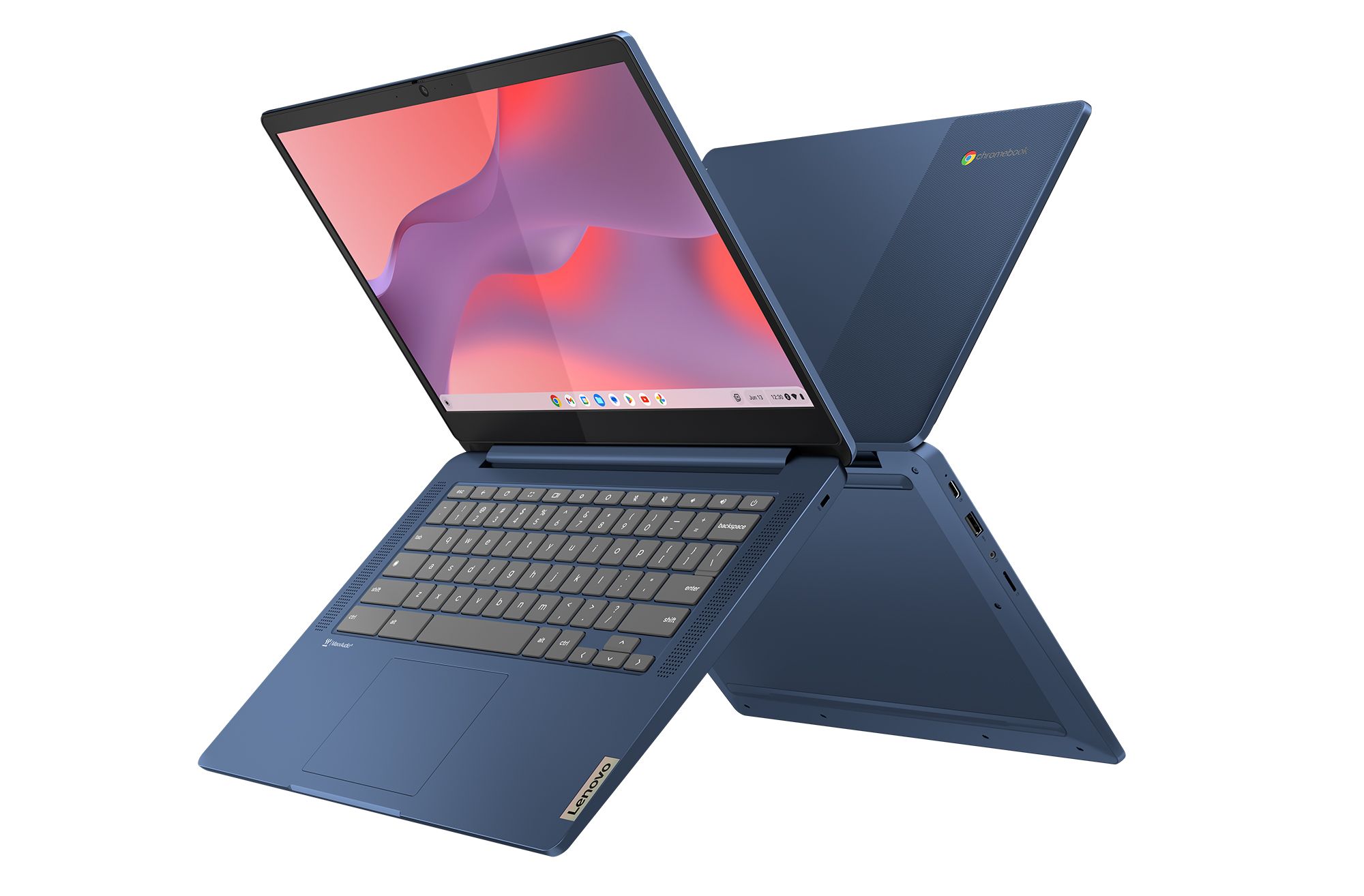
Lenovo IdeaPad Slim 3 Chromebook (14" FHD Touchscreen, MediaTek Kompanio 520)
Best Chromebook
The IdeaPad Slim 3 Chromebook is the best Chromebook in this guide. The 14-inch Full HD touchscreen is bright and sharp, the MediaTek Kompanio 520 chip handles Google Docs, video calls, and streaming without fuss, and the battery runs up to 13.5 hours. It weighs 2.87 pounds.
- Display: 14-inch FHD IPS touchscreen, 1920 x 1080, 300 nits, 100% sRGB
- Processor: MediaTek Kompanio 520, 8 cores
- Memory: 4GB
- Storage: 64GB eMMC, microSD card slot
- Battery: Up to 13.5 hours
- Weight: 2.87 pounds
- Features: 720p privacy camera, Wi-Fi 6, Waves MaxxAudio
- Operating system: ChromeOS
Good to know: 4GB of memory is fine for homework, streaming, and a handful of tabs, but it is not enough for dozens of open tabs. The 64GB of storage fills up fast, so plan on Google Drive or a microSD card. ChromeOS does not run Windows-only software, so check that your apps work in a browser first.
The deal is $309.96 on Amazon as of November 13, down from $429.99. That is $120.03 off, a 28 percent cut. It is the deepest discount on a Chromebook in this guide by dollars saved.
The touchscreen is what separates it from the cheaper Chromebooks. Tapping, swiping, and zooming on a 14-inch screen makes research and reading faster, and the 100 percent sRGB coverage keeps colors accurate. The 13.5-hour battery means the charger stays at home.
5. Dell 15.6" 2K Touchscreen Laptop: Best Windows laptop
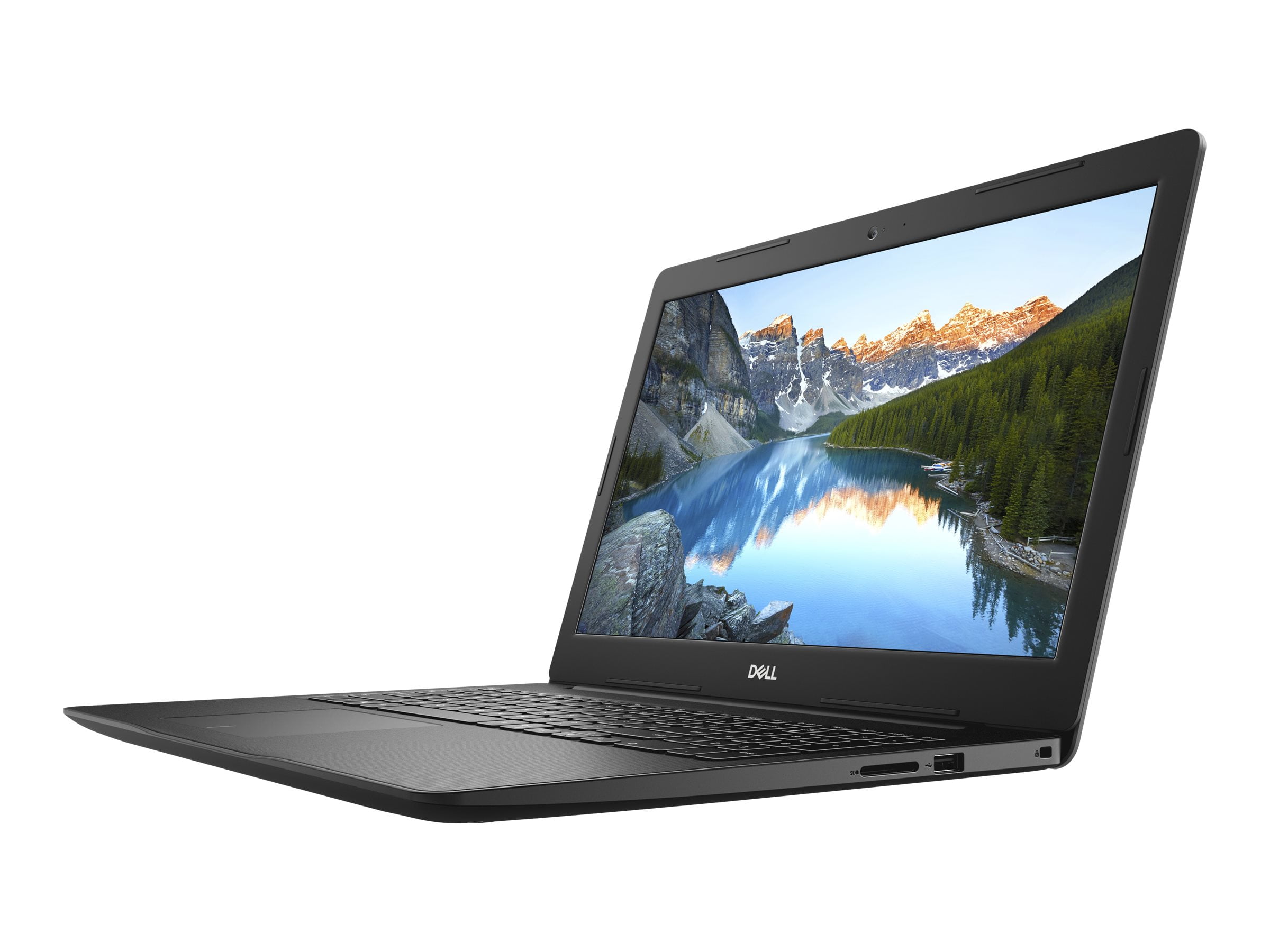
Dell 15.6" 2K Touchscreen Laptop (Core i5-1334U, 8GB, 512GB SSD)
Best Windows laptop
The Dell is the only full Windows laptop in this guide, and it is the only one with a 2K touchscreen. The 13th-gen Intel Core i5-1334U, 8GB of memory, and 512GB SSD handle Microsoft Office, Zoom, and a browser full of tabs. The 15.6-inch 2K display is the sharpest screen in this guide by a wide margin.
- Display: 15.6-inch 2K touchscreen, 2560 x 1440
- Processor: Intel Core i5-1334U, 13th generation
- Memory: 8GB
- Storage: 512GB SSD
- Features: Touchscreen, numeric keypad, backlit keyboard
- Operating system: Windows 11
Good to know: the deal price is at Best Buy. 8GB of memory is the minimum for Windows in 2026, so this is not a machine for heavy multitasking. The 2K touchscreen is the headline feature at this price. Check the exact configuration at checkout: Dell 15.6-inch listings vary by processor and screen.
The deal is $449.99 at Best Buy as of November 13, down from $849.99. That is $400 off, a 47 percent cut. It is the deepest discount in this guide by both dollars and percentage, and the only Windows laptop under $500 with a 2K touchscreen.
The screen is the reason to buy it. A 15.6-inch 2K display at $449.99 is a combination that does not normally exist. Text is sharp, spreadsheets fit more columns, and photos look better. The 13th-gen Core i5 is a current-generation chip with enough cores for office work, video calls, and a browser full of tabs.
At a glance
| Laptop | Best for | Price (as of Nov 13) | |
|---|---|---|---|
| Lenovo Chromebook Flex 3 11" | Cheapest deal | $219 (was $270) | Check on Amazon |
| ASUS 2026 Chromebook 14" | 14-inch value | $249 (was $299) | Check on Amazon |
| ASUS CX14 Chromebook | Cheapest Celeron | $278.99 (was $359.99) | Check on Amazon |
| Lenovo IdeaPad Slim 3 Chromebook | Best Chromebook | $309.96 (was $429.99) | Check on Amazon |
| Dell 15.6" 2K Touchscreen Laptop | Best Windows | $449.99 at Best Buy (was $849.99) | Check on Amazon |
How to pick a budget laptop
Choose the operating system first. This is the decision that matters most under $500. ChromeOS is the right choice when the work lives in a browser: Google Docs, Gmail, Canvas, and video calls. It is fast on cheap hardware, it boots in seconds, and it does not slow down over four years. Windows is the right choice when the work needs desktop software: Microsoft Office, Zoom, QuickBooks, or any app that only runs on Windows. Four of the five laptops in this guide run ChromeOS. The Dell runs Windows.
Check the memory, and check it against the operating system. 4GB of memory is fine on ChromeOS, because ChromeOS is light and the work lives in the cloud. 4GB of memory is not enough on Windows. A Windows laptop with 4GB will feel slow on day one, and it will not get better. The Dell in this guide ships with 8GB, which is the minimum for Windows in 2026. Never buy a Windows laptop with 4GB of memory, no matter how low the price.
Check the storage type, not just the size. Chromebooks ship with 64GB of eMMC storage, which is slow flash memory. It works for ChromeOS because the files live in Google Drive. Windows laptops need an SSD. The Dell ships with a 512GB SSD, which is the right size and the right type. A Windows laptop with eMMC storage or a hard drive will feel slow every time it opens a file. Avoid both.
Size the screen for the work. An 11.6-inch screen is fine for browsing and video. It is not fine for writing a long document or working in a spreadsheet. A 14-inch Full HD screen is the minimum for a primary laptop, and it is what four of the five laptops in this guide carry. The Dell's 15.6-inch 2K screen is the sharpest in the guide, and it is the one to buy if the work involves spreadsheets, photos, or long documents.
Check the ChromeOS update window. Chromebooks receive automatic updates until a fixed date, called the Auto Update Expiration. The 2026 ASUS Chromebook has the longest window in this guide, because it is the newest model. A Chromebook past its update date still works, but it stops receiving security updates. Check the date before you buy a Chromebook, and prefer a newer model when the price is close.
The pattern is clear. Amazon's Black Friday Week runs November 19 to 30, with up to 30 percent off select laptops. Adobe forecasts computer discounts peaking around 23 percent on Cyber Monday, November 30. Four of the five laptops here are already discounted by 17 to 47 percent, and the Dell at 47 percent off is the deepest discount in the guide.
Questions we get asked
Is a $219 Chromebook good enough for school work?
Yes, for browsing, email, Google Docs, and video calls. The Lenovo Chromebook Flex 3 at $219 handles all of that. The 11.6-inch HD screen is the limit: it is fine for short sessions, and it is not sharp enough for long writing. For a primary school laptop, spend $30 more on the ASUS 2026 Chromebook at $249, which buys a full-size 14-inch Full HD screen.
What is the difference between a Chromebook and a Windows laptop?
The operating system, and what it runs. A Chromebook runs ChromeOS, which is built around the browser. It runs web apps and Android apps, but not Windows desktop software. A Windows laptop runs Microsoft Office, Zoom, QuickBooks, and every Windows app. Chromebooks are faster on cheap hardware and cheaper to buy. Windows laptops run more software. Pick based on the apps you need.
How much RAM does a budget laptop need?
4GB is enough on a Chromebook. It handles Google Docs, a video call, and a handful of tabs at the same time. 8GB is the minimum on a Windows laptop. A Windows laptop with 4GB of memory will feel slow on day one. The Dell in this guide ships with 8GB, which is the right size for office work and a browser full of tabs. Never buy a Windows laptop with 4GB.
Should I buy a touchscreen on a budget laptop?
Yes, if the price is close. A touchscreen makes browsing, reading, and zooming faster, and it is useful for video calls and for Windows apps that support touch. The IdeaPad Slim 3 Chromebook at $309.96 and the Dell at $449.99 both have touchscreens. The ASUS 2026 Chromebook and the CX14 do not. The touchscreen costs about $30 to $60 more, and it is worth it.
Should I wait for Black Friday or buy an early deal now?
Buy now if the price is already at its low. The Dell at $449.99 is 47 percent off, past Adobe's forecast peak for computers. The IdeaPad Slim 3 Chromebook at $309.96 is 28 percent off. Amazon's holiday return window runs until January 31, 2027, so a later price drop is covered.
More Black Friday deals on Feldren: Best Black Friday 2-in-1 Laptop Deals 2026, Best Black Friday MacBook Deals 2026, and Best Black Friday Robot Vacuum Deals for Pet Hair 2026.